
How To Install MicroEJ Plugin Snapshot Version on Android Studio or IntelliJ IDEA
If you want to test the version under development, the latest snapshot version of the plugin can be installed:
In IntelliJ IDEA or Android Studio, go to
File > Settings....Go to
Pluginsmenu.Click on the icon at the right of the
Installedtab, then click onManage Plugin Repositories.
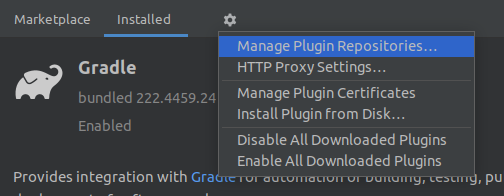
IntelliJ IDEA and Android Studio Plugin Repository
Click on the
+icon.Set the URL
https://repository.microej.com/intellij-plugins/snapshots/updatePlugins.xml.Click on the
OKbutton.Click on the
Marketplacetab.In the search field, type
MicroEJ:

IntelliJ IDEA and Android Studio Snapshot Plugin Installation
Click on the
Installbutton.Click on the
Restart IDEbutton.